8 min read · EN
Workflows, Git Safety & Testing
Build a Claude Code verification loop around tests, Git checkpoints and diff reviews before accepting generated changes.
Claude Code is powerful but not infallible. It generates plausible code that compiles, passes type checks, and looks right, but "looks right" isn't the same as "is right." This module covers the workflows that keep you safe when letting an AI agent modify your codebase.
The Verify Loop
The single most valuable workflow in Claude Code is deceptively simple:
Write code → Run tests → Read failures → Fix → Run tests again
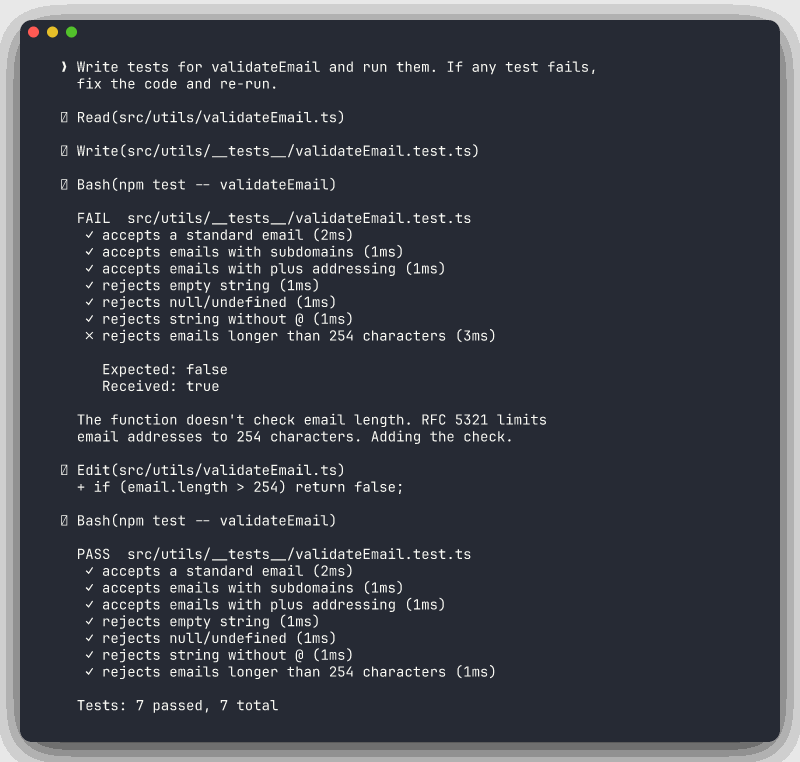
This isn't "run and hope." Claude Code reads stack traces, understands assertion errors, interprets compiler output, and adapts its approach. It will often fix a test failure differently than it caused it, finding the actual root cause rather than papering over the symptom.
The key to making this work: tell Claude Code how to run your tests. Include test commands in your CLAUDE.md so it doesn't have to guess.
## Commands

```bash
npm test             # Jest, full suite
npm run test:watch   # Jest in watch mode (single file)
npm run lint         # ESLint + Prettier check
```
When Claude Code knows the test command, it can close the loop autonomously. Without it, it writes code and stops, and you lose the most valuable part of the agentic workflow.
Test-Driven Prompts
These prompts activate the verify loop naturally:
- "Write tests for the login function and run them" forces Claude to both write and validate
- "Run the test suite and fix any failing tests" is a pure fix-iterate cycle
- "Add edge case tests for email validation: empty strings, missing @, unicode characters, strings over 254 chars" is specific enough to produce meaningful coverage
- "This function has a bug where it returns null for empty arrays. Write a failing test first, then fix the function" gives you TDD style, test-then-fix
Git Checkpoint Workflow
Git is your safety net. Not "nice to have," but essential. The workflow is simple and should become muscle memory.
Before Claude Makes Changes
Check your working state and create a checkpoint:
If unrelated changes are already staged, unstage only those paths without discarding their contents. For mixed edits within a file, use git add -p -- path/to/file to stage only intended hunks. Apply the same rule to the post-task commit.
git status --short --untracked-files=all
git diff
git diff --cached
# Inspect new files listed by status. Replace these example paths with yours.
git add -- src/auth.ts tests/auth.test.ts
git diff --cached
git commit -m "checkpoint: before Claude changes"
The checkpoint records the reviewed files, not a guarantee that they work. Leave unrelated work out of the commit, including anything already staged. Verify the starting behavior before treating it as a recovery baseline.
After Claude Makes Changes
Review what changed, then commit intentionally:
git status --short --untracked-files=all  # Includes new files
git diff                                # Unstaged tracked changes
git diff --cached                       # Already staged changes
# Open and review each new file. Replace these example paths with yours.
git add -- src/auth.ts tests/auth.test.ts # Only reviewed, intended paths
git diff --cached                       # Final staged diff, including new files
git status --short --untracked-files=all
git commit -m "feat: add email validation with unicode support"
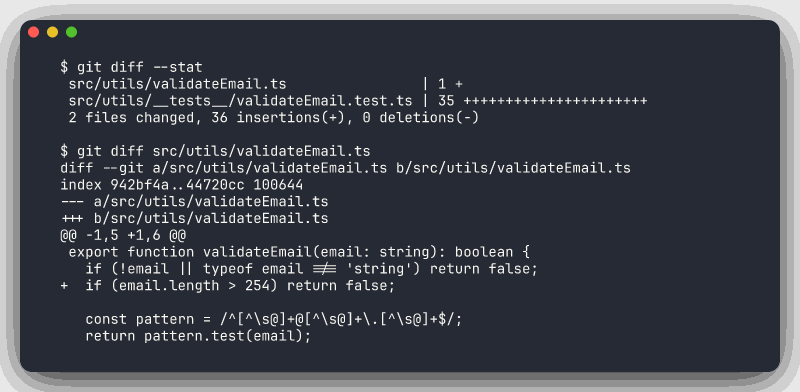
Plain git diff shows neither already staged changes nor untracked file contents. See the Git references for diff and status.
When Things Go Wrong
You have options depending on how far things have gone:
# Inspect before discarding anything
git status --short --untracked-files=all
git diff -- src/auth.ts
git diff --cached -- src/auth.ts

# Discard only selected unstaged hunks in this tracked example file
# Select only Claude's unwanted edits, not your own work
git checkout -p -- src/auth.ts

# For an unwanted shared commit, first preserve unrelated local work
# Start from a clean working tree; replace COMMIT_SHA with the intended commit
git revert COMMIT_SHA
You can ask Claude to propose an undo, but inspect the affected paths and diff before allowing it:
- "Show which edits you made and propose how to undo only those edits. Preserve unrelated work."
- "Undo only your changes to src/auth.ts. Show me the diff first; keep my existing edits."
/rewind — Navigate Checkpoints
The /rewind menu lets you restore conversation, tracked file edits, or both to a checkpoint. It is partial session recovery, not a known-good-state guarantee. Files changed only through Bash and many subagent edits are not restored; remote actions such as pushes, deployments or messages are not undone. Inspect what remains and use Git and service-specific recovery where needed. See the checkpointing limitations.
This is especially useful when Claude went down a wrong path mid-task. Instead of /clear (which loses everything) or continuing (which carries forward the bad context), /rewind lets you go back to the decision point and redirect.
Ctrl+G — Edit Before Executing
When Claude proposes a plan or a sequence of actions, press Ctrl+G to edit the plan before it executes. This gives you a chance to narrow scope, adjust the approach, or remove steps you don't want — without rejecting the entire plan and re-prompting from scratch.
The Rhythm
For any non-trivial task, the rhythm looks like this:
- Checkpoint commit
- Give Claude a task
- Review the diff
- Commit (or revert)
- Next task
Small commits help separate changes, but recovery still needs review. If step 3 reveals unwanted edits, preserve unrelated work and undo only the intended changes before trying again.
Review Diffs Before Accepting
This is the golden rule of AI-assisted development: read the diff before you commit.
What to Check
- Only intended files are modified. If you asked Claude to fix a bug in
auth.ts, and it also modifiedconfig.ts,utils.ts, andpackage.json, ask why before accepting - The logic is actually correct. AI code can look syntactically perfect while having subtle logic errors. Read it like you'd read a PR from a colleague
- Error handling is preserved. Claude sometimes simplifies code by removing try/catch blocks, null checks, or edge case handling. If the original code handled errors, the new code should too
- No hardcoded values appeared: API URLs, credentials, magic numbers, debug flags
- The scope matches your request. Did you get what you asked for, or something adjacent?
The PR Standard
This means:
- Read the full diff, not just the summary
- Question changes you don't understand
- Push back on unnecessary modifications
- Ask for explanations: "Why did you change the error handling in the catch block?"
- Request reverts: "Revert the changes to utils.ts — I only asked you to modify the controller"
Claude Code responds well to specific pushback. It won't argue. It'll explain its reasoning or undo the change.
Common Pitfalls
Blind Trust
AI-generated code has a specific failure mode: it looks more correct than it is. The syntax is clean, the variable names are sensible, the structure follows patterns. This surface-level quality can trick you into skimming rather than reading.
Common blind-trust failures:
- Logic bugs: the code handles the happy path but fails on edge cases the AI didn't consider
- Security gaps: missing input validation, SQL injection vectors, improper auth checks
- Convention mismatches: correct code that doesn't follow your team's patterns, making the codebase inconsistent
- Dependency assumptions: using a library method that doesn't exist in your installed version
The fix is verification, not distrust. Run the tests. Read the diff. Check edge cases.
Scope Creep
You asked Claude to fix a null pointer exception. It fixed the bug, refactored the surrounding method into three smaller methods, renamed two variables for "clarity," updated the imports, and added JSDoc comments to the file.
Each individual change might be fine. Together, they make the diff unreadable and the review impossible.
Prevention strategies:
- Be specific: "Fix the null check on line 42 of auth.ts. Don't modify anything else."
- Use "ONLY" as a boundary marker: "ONLY modify the
validateTokenfunction" - Scope with plan mode: "Plan how you'd fix this bug. Don't make changes yet." Then review the plan, and approve or narrow it
- Reject and re-prompt: "Revert everything except the null check fix. I'll handle the refactoring separately."
Long Sessions Without Checkpoints
After 45 minutes of back-and-forth, Claude has made changes across 12 files. Something isn't working, and you're not sure when it broke. You have no commits since you started.
This is the worst position to be in. You can't revert cleanly. You can't diff against a known-good state. Your options are "keep debugging" or "lose everything."
The fix: commit after every successful change, not at the end of the session. Small, frequent commits are free. Lost work is expensive.
Production Checklist
Before merging any AI-assisted changes, walk through this checklist:
- [ ] All tests pass: run the full suite, not just the tests Claude wrote
- [ ] Full Git review: status, unstaged and staged diffs, new file contents, then the final staged diff; no unrelated work or scope creep
- [ ] No hardcoded secrets or credentials: API keys, passwords, tokens, connection strings
- [ ] No removed error handling: try/catch blocks, null checks, validation logic, fallbacks
- [ ] Changes match the original request: you got what you asked for, not more
- [ ] Edge cases considered: empty inputs, null values, concurrent access, network failures
- [ ] Manual smoke test: for UI or API changes, run the app and verify the behavior
Putting It Together
The safe workflow for any non-trivial Claude Code task:
1. git commit -m "checkpoint: before task X"
2. Prompt Claude with a specific, scoped task
3. Let the verify loop run (write → test → fix → test)
4. Review status, unstaged/staged diffs and new files; stage only intended paths
5. Walk through the production checklist
6. Review git diff --cached, then git commit -m "feat/fix: description of what changed"
7. Next task
This is the workflow that lets you move fast with confidence. The developers who skip steps 1, 4, and 5 are the ones who spend afternoons debugging AI-introduced regressions.
Want to discuss a project like this?
SFLOW helps companies implement practical AI solutions — from custom platforms to industrial integrations with your existing systems.