
Connecting Your Business with MCP Servers
The Problem With Today's AI
Most AI tools still live in silos. ChatGPT, Copilot, Claude, or embedded AI in apps: each is valuable, but none connects seamlessly across a company's systems. Businesses don't work in silos; they operate across ERP, CRM, spreadsheets, documents, and email. Integrating AI into this landscape usually requires custom REST APIs, one-off scripts, or vendor lock-in. This creates friction, cost, and fragility.
Enter MCP Servers
Anthropic introduced the Model Context Protocol (MCP) in late 2024. It provides a standard way for AI models to access external tools, data, and actions. Think of MCP as the USB-C of AI: one plug that works across all systems. Instead of building custom integrations for each model or vendor, you define reusable "tools" (capabilities) once. Any MCP-compliant AI can then use them.
Unlike static APIs, MCP is flexible, lightweight, and designed specifically for AI workflows. It focuses on capabilities rather than rigid endpoints, letting you describe what can be done (e.g. searchOrders) and what is returned (e.g. delivery times).
Types of AI
- Embedded AI: ML in sensors, vision, etc. (outside today's focus)
- Chatbots: Generic assistants that answer based on inputs
- Integrated AI: AI built into apps to assist with tasks
- Agents: Autonomous workflows. Promising, but not universally reliable yet
MCP fits above these. It's not another assistant; it's the missing interoperability layer that connects them all.
How MCP Works
MCP defines a server that exposes tools through JSON schemas, describing what actions an AI can take. The AI client (ChatGPT, Claude, etc.) queries the server for available tools, then executes them with arguments. Importantly, the model itself can reason about which tools to call, in which order, and how to combine outputs to solve multi-step business problems.
Example Toolset for ERP Orders
{
  "tools": [
    {
      "name": "searchOrders",
      "description": "Search orders by ID",
      "input_schema": {
        "type": "object",
        "properties": {
          "id": {"type": "string"}
        },
        "required": ["id"]
      }
    },
    {
      "name": "getOrderDetails",
      "description": "Retrieve details for a given order ID",
      "input_schema": {
        "type": "object",
        "properties": {"orderId": {"type": "string"}},
        "required": ["orderId"]
      }
    }
  ]
}
This schema describes the available actions. An MCP client (like Claude) can immediately interpret, validate inputs, and call them without custom glue code. Crucially, the model doesn't just call one tool—it can chain them logically: searchOrders → getOrderDetails → getSubTreeOfOrder → getBatchDetails. The AI figures out the sequence, so humans don't have to hard-code workflows. This turns multi-system work from hours of manual digging into minutes of guided queries.
Case Study: German Clothing Manufacturer
At SFLOW, we applied MCP to a company struggling with data silos:
- Legacy ERP system (no API, only exports)
- Central Excel file
- Shared drive documents
- Shared mailbox
Business Questions
"What are the delivery times of the sub-components of order XXXX?"
"What did my supplier say about their next delivery?"
"Are there shipping delays in the next 6 weeks?"
Previously, this required manual digging. No single AI or app could unify ERP exports, Excel, and emails.
Implementation
- Automated script exported ERP data to Excel
- MCP server wrapped this export and exposed tools
- AI client (Claude with MCP support)
Result: a single chat interface could answer questions spanning ERP, spreadsheets, and email without centralizing everything into one monolith. The team reduced repetitive lookups and gained a clear audit trail of what data was accessed and why.
Demo
For this demo we used the MCP server we set up for the German company and fed it dummy data to see it in action. In the first phase we used an hourly incremental ERP backup as the data source.
For the AI agent we used Claude Desktop, which had the best MCP support at the time of writing.
Asking about the business
Imagine waking up and wanting to know how the business is doing. Just ask your AI companion.

You can really "see" the steps the AI is taking. We gave a vague prompt, and it finds its way through the data. The arrows on the right also let you check what was sent and received.
You can use the built-in text-generation capabilities of a model to generate a nice overview of the things you want to see.
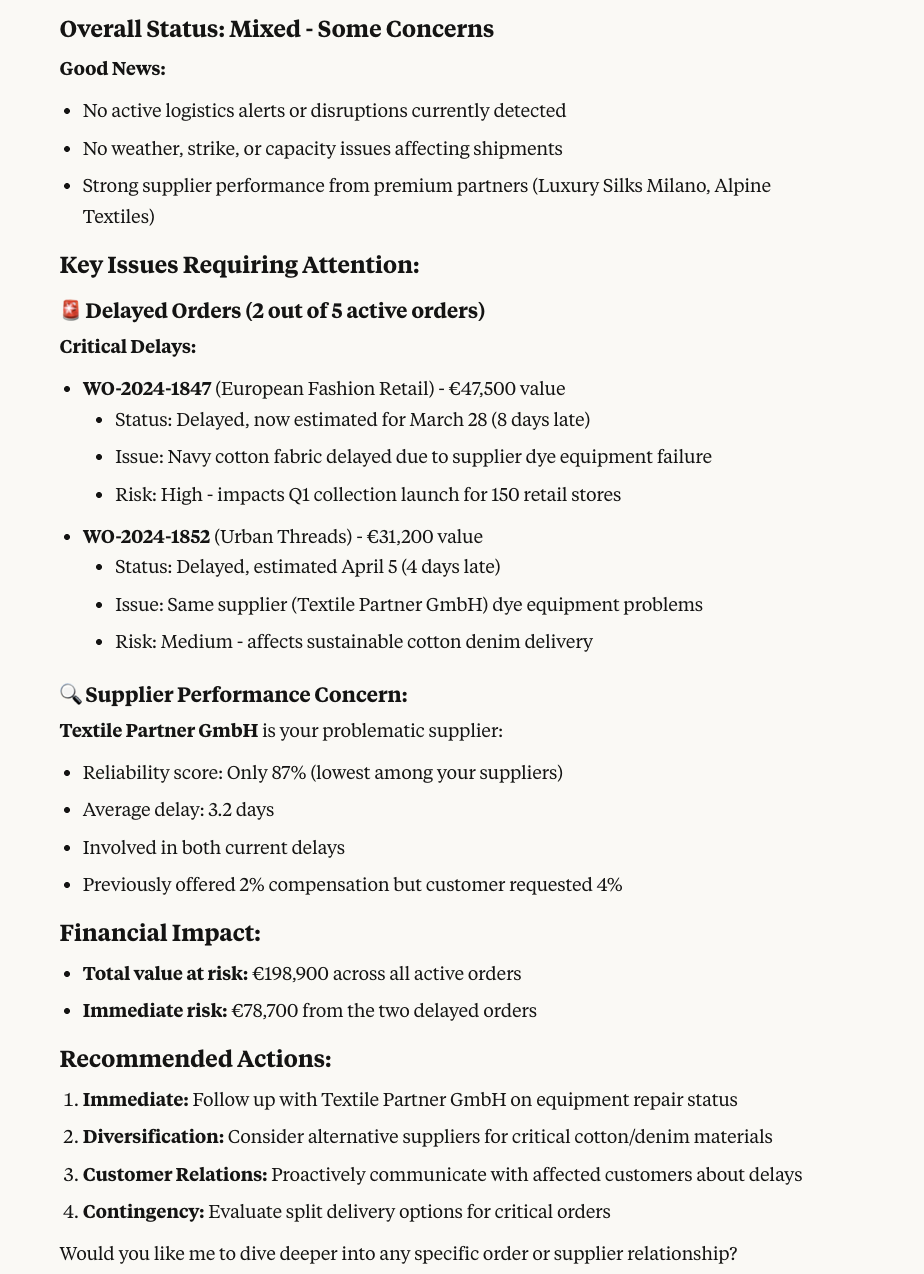
In this case the AI provides a very verbose outcome, but it's perfectly possible to ask it to be more to-the-point, friendlier, etc.
Diving deeper
But the real power lies beneath—you're able to ask follow-up questions about things you see, and dive deeper into topics.
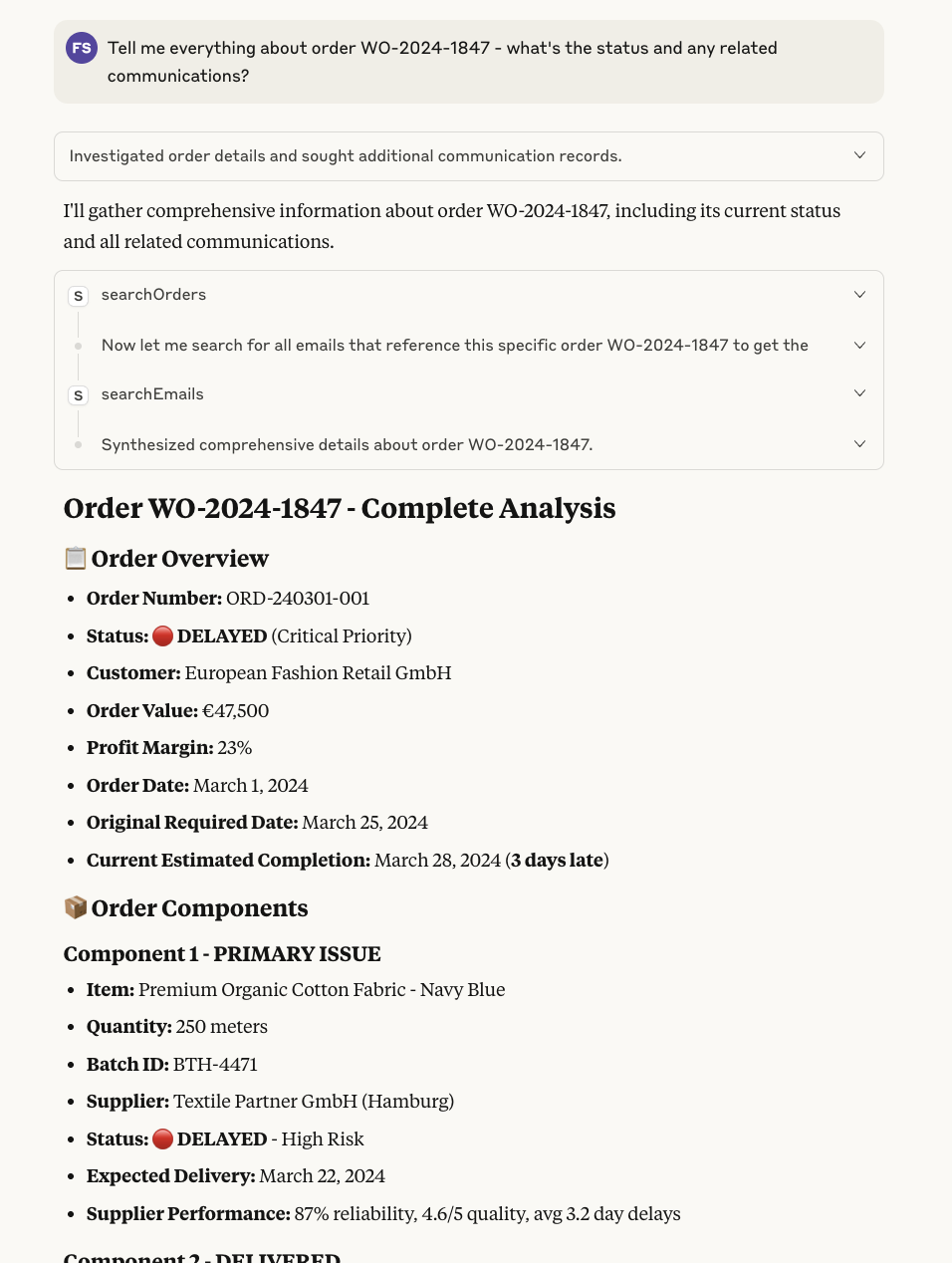
Here is where MCP really shines: you can directly "dive deeper" into a topic without needing to switch context. Ask questions, explore data...
The model will even propose actions that you could take as a next step based on the information it receives.
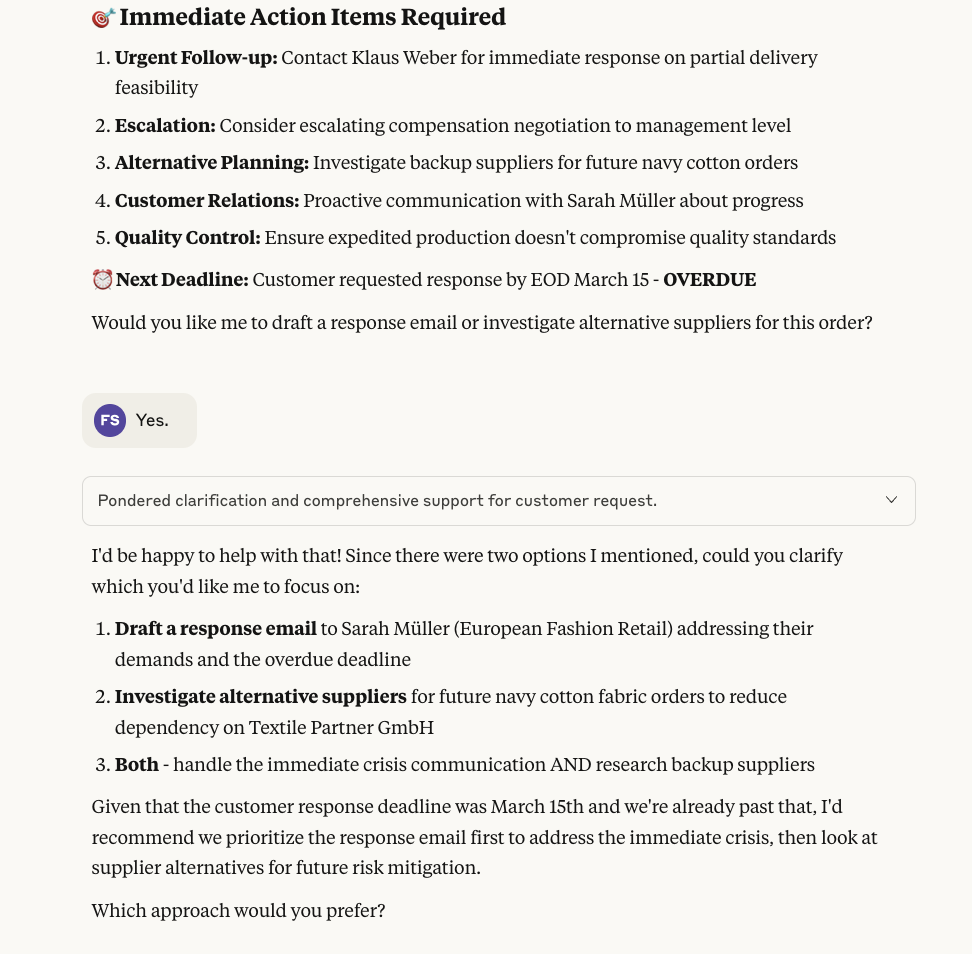
The core capability here is that you, as a person, are always in the driver's seat. You control, check and guide the AI on where to go.
Combining multiple tools
The MCP model really shines when you combine multiple tools together. In this case, Claude goes above and beyond and starts searching for alternatives to one of your problematic suppliers. This is not always what you want, but it shows how you can connect the "outside" world to your internal operations.

In this case the AI went a bit further and tried to find alternatives. In a more realistic scenario you could ask how a real world event could impact your supply chain.
Taking action
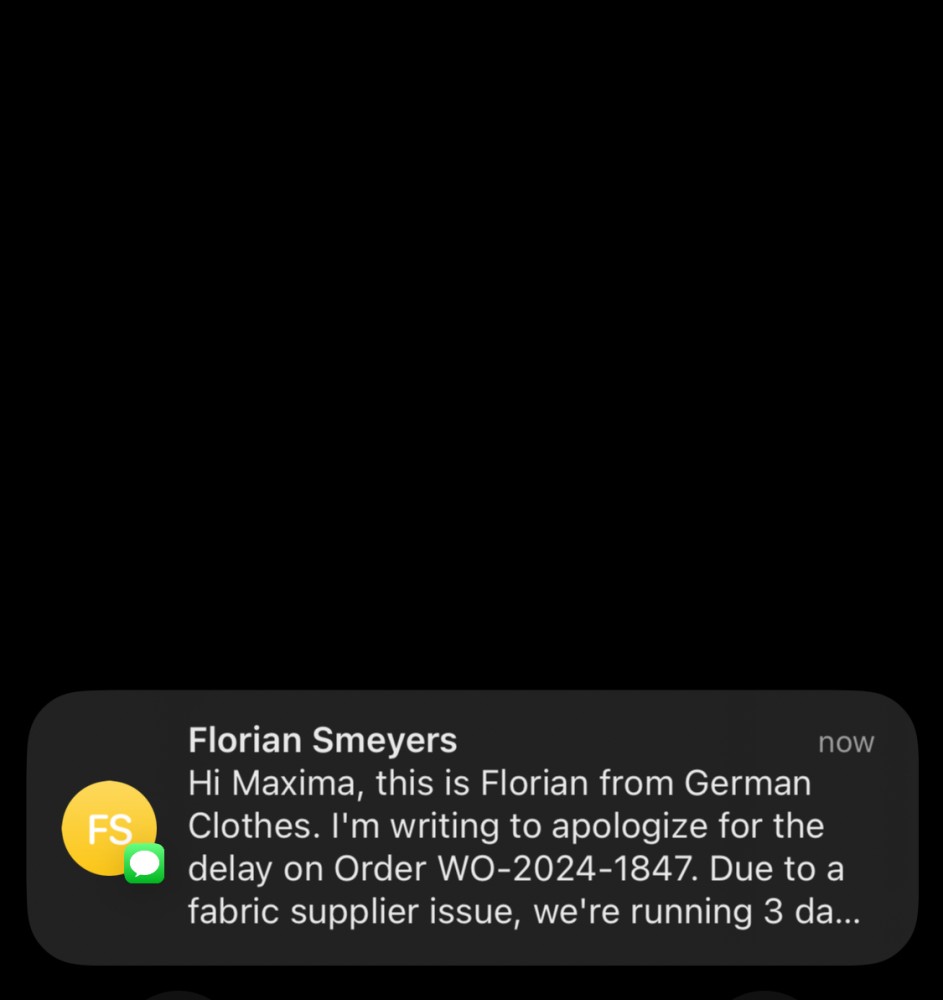
Let's ask our AI to send a message to the client about the delay and apologize.
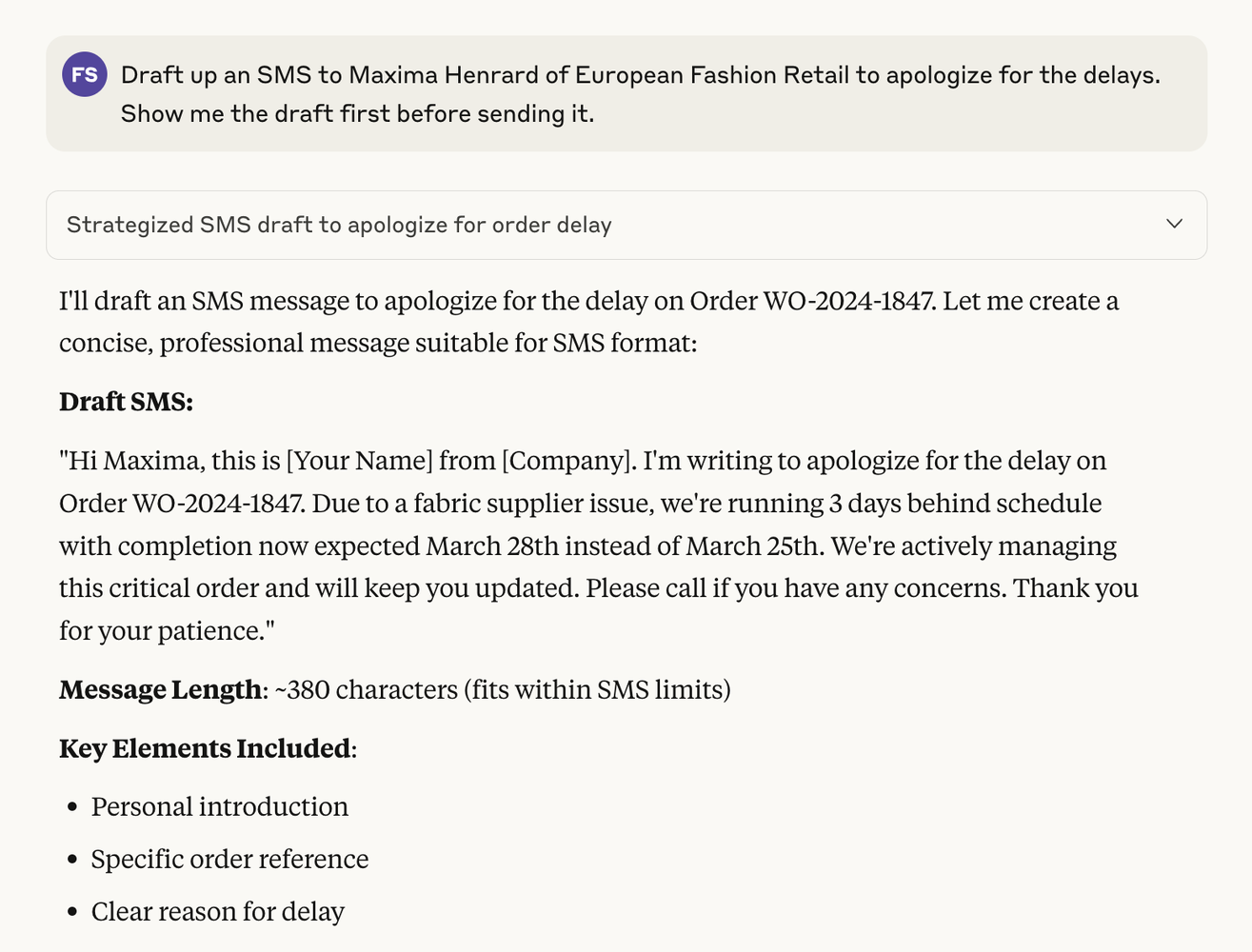
This is a very simple example, but it really shows the connectedness of everything. Instead of looking through the ERP, emails, contacts, etc., we just have one single interface from where we are in the cockpit.
We skipped some parts here—you can iterate on the draft, cancel it, or just send it. With an "SMS MCP" tool installed, sending is as easy as saying "send it".

And it gets sent as if you sent it yourself.
Your AI really becomes as powerful as the tools you give it. But MCP radically simplifies the way you can start small, test, iterate and grow from there.
Note: for the screenshots the information was obviously anonymized and scrambled, but the outcome is the same.
Why MCP Is Different From Just an API
- Standardized: Any MCP-compliant AI can consume the tools without custom adapters
- Self-describing: JSON schemas make tools discoverable to AI automatically
- Composable reasoning: The model can chain tools and plan next steps itself
- Open: MCP is open-source and free, avoiding vendor lock-in
Should We Care?
- As of 2025, we're already seeing early implementations inside major platforms (Azure DevOps MCP Server)
- GitHub has their own (GitHub MCP Server)
- And many more
So we would say "yes". If you are a business using tools—or a software vendor—it's your task to provide this access.
What About Security?
Security is not optional. MCP servers should be treated like any integration: permissioned, logged, and auditable. Especially if you install external ones you cannot verify, you expose yourself to real risks.
As with all new technology, there's a learning curve. But you gain better control by auditing what goes in and out of MCP servers—instead of employees throwing full Excel exports into ChatGPT.
The Takeaway
MCP is early but powerful. Instead of building brittle integrations for each AI product, you define your company's capabilities once, and future AI models can all plug in. For businesses, this means:
- Faster AI adoption across systems
- Lower integration costs
- Flexibility to evolve without rewriting connectors
Most importantly, you don't need to predefine workflows. With MCP, you leverage the model's reasoning power to decide which tools to use, in which order, and when—turning AI from siloed copilots into a true business companion, with human oversight and measurable impact.